How to Configure Zone MaskingUpdated 5 months ago
Zone Masking is an exciting feature now built into your AI & Alerts service. This feature requires AI and it is only available on accounts which have opted in to AI, or already enjoy the benefits of Standard or Pro service. There is no additional charge for this feature. Please follow the below guide to setup Zone Masking on your cameras.
Please note, you may need to update the mobile app on your device to fully enable this feature. Use these links to update your app.
Google Play Store: https://play.google.com/store/apps/details?id=tech.barnowl.app&hl=en
Apple App Store: https://apps.apple.com/us/app/barn-owl-hq/id6753020554
1. To begin, access Zone Masking by clicking on AI & Alerts from your Barn Owl HQ account.

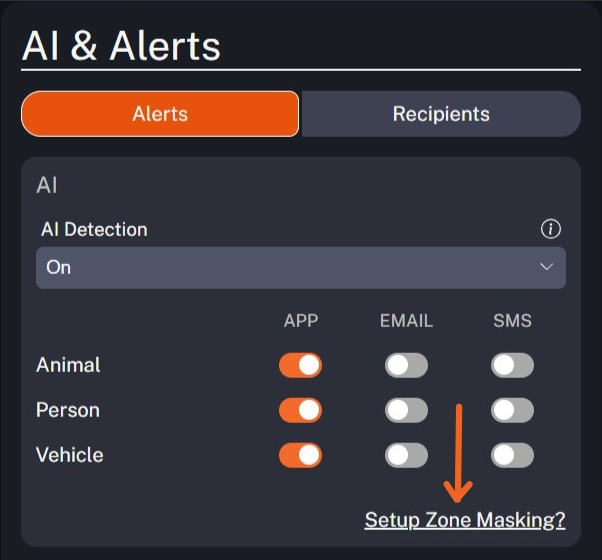
2. Next, click Setup Zone Masking within your AI & Alerts settings.

3. The system will display the most recent image on file as an example. The image now has a grid overlay which shows you the areas that can be ignored by AI Detection & Smart Alerts. In this example, the tree on the far left side and bushes on the lower right side attract a lot of unwanted animal attention. Masking these areas will ignore pesky squirrels and rabbits that may trigger the camera. You may click Clear Mask to erase your selections and start over.
There is no need to confirm your selection once you're finished. Zone Masking will prevent unwanted alerts from reaching you, however it does not prevent the camera from triggering on motion. We encourage customers to keep areas around the camera clear of foliage or obstructions that may cause undesired movement-based triggers in order to receive optional performance from their camera and Zone Masking.